If you’ve ever tried to spot a loose wire behind a wall without tearing out drywall, or check the inside of a pipe for clogs without shutting down an entire plumbing line, you know how valuable a USB inspection camera can be. As a supplier who’s worked with thousands of DIYers, plumbers, electricians, and industrial technicians over the years, I’ve seen firsthand how many people buy these tools and leave them in the box because they don’t take the time to learn the basics. A USB inspection camera isn’t just a wire with a lens—it’s a versatile, easy-to-use tool that can save you hours of guesswork, repairs, and frustration. This guide will walk you through every step of using one effectively, from setup to advanced tips, and I’ll also share how to pick the right one for your needs. USB Inspection Camera
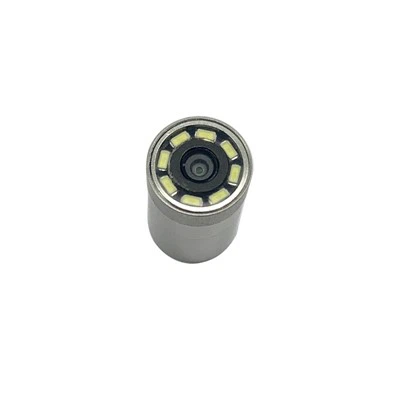
First, let’s start with the basics: what exactly is a USB inspection camera, and why should you care? Unlike traditional cameras that take photos at eye level, these compact, waterproof (most models) devices have a tiny, bright LED lens at the end of a flexible, semi-rigid cable. You plug the other end into a USB port on your laptop, smartphone, or tablet, and the live feed from the lens pops up on a screen in your phone or computer’s app. They’re built for hard-to-reach spaces: behind appliances, inside walls, under floors, in engine bays, or even inside small pipes. The key here is that they don’t require complex training—most people can get up and running in 10 minutes or less. But to use them well, you need to follow a few simple steps to avoid mistakes like blurry photos, dead batteries, or damaging the cable.
Let’s start with setup, because this is where most new users go wrong. First, make sure your device (phone, laptop, or tablet) is compatible. Older phones without USB OTG (On-The-Go) support won’t work with most USB inspection cameras—OTG is the feature that lets your device act as a host for external USB accessories. If you’re using an Android phone, you can check your settings to confirm OTG is enabled; if you’re using an iPhone, make sure your camera model is compatible with Apple’s MFi (Made for iPhone) standards, since Apple has stricter accessory rules. For laptops, almost all have built-in USB ports, so you just need to download the manufacturer’s free app (we provide a direct download link on our site, so you don’t have to hunt for it) before plugging in the camera.
Next, prep your camera before first use. Most new USB inspection cameras come with a plastic cap over the lens to protect it during shipping—always remove that before plugging it in, otherwise you’ll get a blurry, foggy feed. If your model has a rechargeable battery (some connect directly to your device, but many have built-in batteries for standalone use), charge it fully before your first job. Nothing’s worse than getting halfway through a wall inspection and having the camera die on you. Also, check the cable for any kinks or sharp bends—while our cables are built to be flexible, forcing them into a tight space can cause internal damage over time, so straighten out any twists you see before starting.
Once setup is done, it’s time to actually use the camera. Let’s break this down into simple, actionable steps, starting with the most important rule: go slow. The flexible cable is designed to curve, but you can’t force it into a space that’s too small. For example, if you’re checking a ½-inch pipe, don’t try to push a ⅜-inch cable through at full speed—guide it with gentle, steady pressure, twisting the end slightly if it gets stuck to maneuver around corners. The LEDs on the camera lens are adjustable, too: if you’re in a dark space, turn the brightness up, but don’t crank it all the way to 100% right away. Too much light can wash out small details, like a tiny crack in a pipe or a loose screw behind drywall.
When you’re looking at the live feed on your device, take advantage of the app’s basic features. Most cameras let you take photos and record videos directly to your device’s storage, which is perfect for sharing with a professional later or keeping as a record of your work. For example, if you find a leak in a pipe, record a 10-second video to show your plumber instead of trying to describe it over the phone. Another key feature is zoom—don’t stretch the photo on your screen (that just makes it blurry), use the camera’s physical zoom if it has one, or the app’s digital zoom sparingly. The lens’s optimal distance for clear photos is usually between 1 and 6 inches, so try to keep the lens within that range of whatever you’re inspecting, not pressed right up against the surface.
Now, let’s talk about different use cases, because a USB inspection camera works differently depending on what you’re checking. For plumbing, this is one of the most common uses: you can inspect drain lines, sewer pipes, or under-sink pipes for clogs, corrosion, or pipe damage. Our cameras have IP67 waterproof ratings, so you don’t have to worry about splashing water on them, but avoid submerging them for long periods unless you have a dedicated underwater model. When using it for plumbing, mark where you insert the cable to keep track of how far you’ve gone—if you’re checking a 10-foot pipe, you can insert the cable 2 feet at a time and count the length as you go, so you know exactly where a clog is located.
For electricians and DIYers working on home repairs, USB inspection cameras are ideal for checking behind walls, inside electrical panels, or in attic spaces where wiring might be loose. When working with electricity, always turn off the power to the area first, and keep the camera at least a few inches away from live wires to avoid damaging the lens. I’ve heard too many stories of people accidentally touching a live wire with the lens and breaking it—so use the camera’s flexible cable to keep the lens at a safe distance, and take photos of any wiring to compare to your home’s electrical diagram later. For wall inspections, you can also use the camera to check for mold or water damage behind drywall before you start cutting, which saves you from unnecessary demolition.
Automotive use is another big one: you can check engine bays for oil leaks, inspect brake lines, or look inside air filters or carburetors without taking apart half the engine. The small diameter of our cameras (as small as 5.5mm) makes them perfect for squeezing into tight engine spaces. When working on cars, make sure the engine is cool before using the camera to avoid melting the cable, and keep the lens away from hot exhaust components. Many mechanics also use USB inspection cameras to inspect exhaust systems or transmission lines, which saves time and repair costs.
Now, a few common mistakes to avoid, because even the best camera won’t work if you make these errors. First, don’t force the cable. If it’s not going into a space easily, you’re either trying to push it into a space that’s too small, or there’s a bend in the cable that’s catching. Gently twist the cable or pull it back slightly to reposition it—forcing it can break the internal fiber optics, which will make the camera useless. Second, don’t ignore the lens. After each use, wipe the lens with a soft, dry cloth to remove dust, grease, or water. If you get a smudge that won’t come off, use a small amount of lens cleaner (not glass cleaner, which can leave streaks) to gently wipe it. Third, don’t store the camera in a tight space. Keep it in a protective case when you’re not using it, so the cable doesn’t get kinked or damaged.
We also want to share how to maintain your USB inspection camera to make it last for years. After every use, rinse waterproof models with clean water to remove dirt or debris (especially after plumbing jobs), and dry the cable completely before storing it. Avoid leaving the camera in extreme temperatures—don’t leave it in a hot car in the summer, or in a cold garage in the winter, because that can damage the lens and the internal electronics. If you’re using a battery-powered model, remove the batteries if you’re not going to use it for more than a month to avoid leakage.
At the end of the day, a USB inspection camera is only as good as how you use it. It’s a tool that turns hard-to-see spaces into clear, viewable areas, and it doesn’t require a lot of technical skill to master. Whether you’re a DIY homeowner tackling a bathroom plumbing repair, a professional plumber inspecting a commercial building, or an electrician troubleshooting a wiring issue, the right camera will save you time, money, and stress.
If you’re ready to find the right USB inspection camera for your needs, or you’d like to learn more about how our cameras can help your business, we’re here to help. We work with individuals, small businesses, and large industrial teams, and we can provide custom solutions for specific jobs, plus technical support whenever you need it. Whether you’re looking for a compact model for home use or a heavy-duty industrial camera for pipe inspections, we have options that fit every budget and need.

For more guides on using USB inspection cameras, care tips, and product updates, stay tuned to our blog, and feel free to reach out to our team to discuss your specific requirements. We’re always here to help you make the most of your inspection camera.
Industrial Endoscope References
- "On-The-Go USB: A Technical Overview," USB Implementers Forum, 2022.
- "IP Ratings and Their Applications for Consumer Electronics," International Electrotechnical Commission, 2021.
- "Best Practices for Flexible Cable Inspection Tools in Residential Plumbing," American Society of Plumbing Engineers, 2023.
- "OTG Compatibility for Mobile External Accessories," Android Open Source Project, 2022.
- "MFi Accessory Guidelines for Camera Peripherals," Apple Inc., 2023.
Shenzhen EZON Electronics Co., Ltd.
Shenzhen EZON Electronics Co., Ltd. is well-known as one of the leading usb inspection camera manufacturers and suppliers in China. Please feel free to buy customized usb inspection camera at competitive price from our factory. Good service and quality products are available.
Address: 3A-7, Building B, Qianwan Hard Technology Industrial Park, Xixiang Street, Bao’an District, Shenzhen
E-mail: sales@ezon-endosope.com
WebSite: https://www.ezon-endosope.com/
